

Preface
I’m a Network Engineer learning Python, and these are purely my notes. I’m not an expert by any means. Feel free to use any of these examples and improve upon them. Feel free to call me out where things can be done better.
Onward
I have a CSV full of device-specific variables that I need to use in a script built for generating network device configurations. For example:
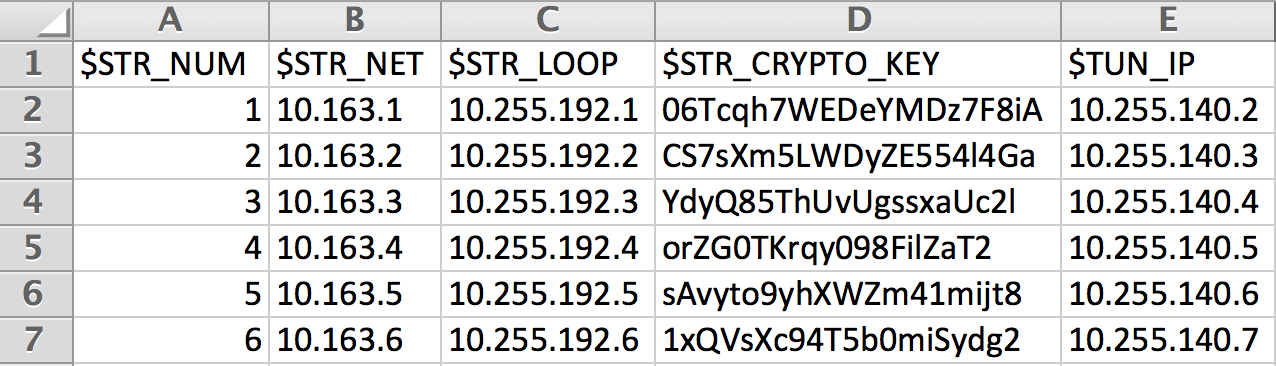
One way I figured out how to do this is to create a list of dictionaries. Think of the list as the row containing the values, and the dictionary as the column. The column headers would be used as the keys.
Hop into the Python interpreter. We’ll import the csv module.
>>> import csv
Next, I’ll create a variable called “reader” which does the following:
- Calls the csv.DictReader function, which tells the interpreter to read the CSV as a dictionary.
- Specify the file to be opened, and use the ‘rb’ method meaning “read binary”
>>> reader = csv.DictReader(open('device-specifics.csv', 'rb'))
Now, create an empty list:
>>> dict_list = []
Lastly we’ll look at each line in “reader” and append the output to our list. Remember, we opened the CSV using the DictReader method, so each line we read should be a dictionary.
>>> for line in reader:
...     dict_list.append(line)
...
Let’s check out the output
>>> dict_list
[{'$STR_CRYPTO_KEY': '06Tcqh7WEDeYMDz7F8iA', '$TUN_IP': '10.255.140.2', '$STR_NUM': '1', '$STR_NET': '10.163.1', '$STR_LOOP': '10.255.192.1'}, {'$STR_CRYPTO_KEY': 'CS7sXm5LWDyZE554l4Ga', '$TUN_IP': '10.255.140.3', '$STR_NUM': '2', '$STR_NET': '10.163.2', '$STR_LOOP': '10.255.192.2'}, {'$STR_CRYPTO_KEY': 'YdyQ85ThUvUgssxaUc2l', '$TUN_IP': '10.255.140.4', '$STR_NUM': '3', '$STR_NET': '10.163.3', '$STR_LOOP': '10.255.192.3'}, {'$STR_CRYPTO_KEY': 'orZG0TKrqy098FilZaT2', '$TUN_IP': '10.255.140.5', '$STR_NUM': '4', '$STR_NET': '10.163.4', '$STR_LOOP': '10.255.192.4'}, {'$STR_CRYPTO_KEY': 'sAvyto9yhXWZm41mijt8', '$TUN_IP': '10.255.140.6', '$STR_NUM': '5', '$STR_NET': '10.163.5', '$STR_LOOP': '10.255.192.5'}, {'$STR_CRYPTO_KEY': '1xQVsXc94T5b0miSydg2', '$TUN_IP': '10.255.140.7', '$STR_NUM': '6', '$STR_NET': '10.163.6', '$STR_LOOP': '10.255.192.6'}]
Yikes, that’s hard to see. I’ll pretty print it instead:
>>> import pprint
>>> pprint.pprint(dict_list)
[{'$STR_CRYPTO_KEY': '06Tcqh7WEDeYMDz7F8iA',
  '$STR_LOOP': '10.255.192.1',
  '$STR_NET': '10.163.1',
  '$STR_NUM': '1',
  '$TUN_IP': '10.255.140.2'},
 {'$STR_CRYPTO_KEY': 'CS7sXm5LWDyZE554l4Ga',
  '$STR_LOOP': '10.255.192.2',
  '$STR_NET': '10.163.2',
  '$STR_NUM': '2',
  '$TUN_IP': '10.255.140.3'},
 {'$STR_CRYPTO_KEY': 'YdyQ85ThUvUgssxaUc2l',
  '$STR_LOOP': '10.255.192.3',
  '$STR_NET': '10.163.3',
  '$STR_NUM': '3',
  '$TUN_IP': '10.255.140.4'},
 {'$STR_CRYPTO_KEY': 'orZG0TKrqy098FilZaT2',
  '$STR_LOOP': '10.255.192.4',
  '$STR_NET': '10.163.4',
  '$STR_NUM': '4',
  '$TUN_IP': '10.255.140.5'},
 {'$STR_CRYPTO_KEY': 'sAvyto9yhXWZm41mijt8',
  '$STR_LOOP': '10.255.192.5',
  '$STR_NET': '10.163.5',
  '$STR_NUM': '5',
  '$TUN_IP': '10.255.140.6'},
 {'$STR_CRYPTO_KEY': '1xQVsXc94T5b0miSydg2',
  '$STR_LOOP': '10.255.192.6',
  '$STR_NET': '10.163.6',
  '$STR_NUM': '6',
  '$TUN_IP': '10.255.140.7'}]
As you can see, we have a list that contains 6 dictionaries, each with their respective key/value pairs. Woot!
Example in a script, using this as a function
This script will take in an arguement (your csv file) as sys.argv and print out the translated list of dictionaries
#!/usr/bin/env python

import csv
import sys
import pprint

# Function to convert a csv file to a list of dictionaries.  Takes in one variable called "variables_file"

def csv_dict_list(variables_file):

	# Open variable-based csv, iterate over the rows and map values to a list of dictionaries containing key/value pairs

	reader = csv.DictReader(open(variables_file, 'rb'))
	dict_list = []
	for line in reader:
		dict_list.append(line)
	return dict_list

# Calls the csv_dict_list function, passing the named csv

device_values = csv_dict_list(sys.argv[1])

# Prints the results nice and pretty like

pprint.pprint(device_values)
Test it out, passing in the argument device-specifics.csv
$ ./csv_dict_list.py device-specifics.csv
[{'$STR_CRYPTO_KEY': '06Tcqh7WEDeYMDz7F8iA',
  '$STR_LOOP': '10.255.192.1',
  '$STR_NET': '10.163.1',
  '$STR_NUM': '1',
  '$TUN_IP': '10.255.140.2'},
 {'$STR_CRYPTO_KEY': 'CS7sXm5LWDyZE554l4Ga',
  '$STR_LOOP': '10.255.192.2',
  '$STR_NET': '10.163.2',
  '$STR_NUM': '2',
  '$TUN_IP': '10.255.140.3'},
 {'$STR_CRYPTO_KEY': 'YdyQ85ThUvUgssxaUc2l',
  '$STR_LOOP': '10.255.192.3',
  '$STR_NET': '10.163.3',
  '$STR_NUM': '3',
  '$TUN_IP': '10.255.140.4'},
 {'$STR_CRYPTO_KEY': 'orZG0TKrqy098FilZaT2',
  '$STR_LOOP': '10.255.192.4',
  '$STR_NET': '10.163.4',
  '$STR_NUM': '4',
  '$TUN_IP': '10.255.140.5'},
 {'$STR_CRYPTO_KEY': 'sAvyto9yhXWZm41mijt8',
  '$STR_LOOP': '10.255.192.5',
  '$STR_NET': '10.163.5',
  '$STR_NUM': '5',
  '$TUN_IP': '10.255.140.6'},
 {'$STR_CRYPTO_KEY': '1xQVsXc94T5b0miSydg2',
  '$STR_LOOP': '10.255.192.6',
  '$STR_NET': '10.163.6',
  '$STR_NUM': '6',
  '$TUN_IP': '10.255.140.7'}]